


Google says AI Overviews and AI Mode need no special schema.org markup, while Bing says annotations help it understand what type of content a page holds. Keep accurate markup in place for the systems that document it, and put the effort into the checks every system shares: crawl access, visible content and testing.
The order of work is to check that crawlers can reach the page and read its main answer in visible text, then add accurate schema for one page type, then test it. That order suits a site on WordPress, Shopify, Wix, Squarespace, Webflow or plain HTML, and it holds whichever AI answer system you are aiming for.
Valid markup does not guarantee a rich result, a citation, a ranking or traffic. Aim for a page that is reachable, clearly written, accurately described and correctly tested.
What Google, Bing, OpenAI and Perplexity say
Google's AI features documentation (Google Search Central, 2026) says there are no additional technical requirements for AI Overviews and AI Mode, and no special schema.org structured data to add. The same AI features page says a page must be indexed and eligible to appear in Search with a snippet before it can be a supporting link, and it recommends that structured data match the visible text.
Google's guide to optimizing for generative AI features (2026) says structured data is not required for generative AI search, and it suggests continuing to use structured data as part of an overall SEO strategy because it can support eligibility for Google rich results.
Bing's structured data documentation (Bing Webmaster Tools, 2026) lists Schema.org and JSON-LD as supported formats. It says annotations can help Bing understand the type of content on a page and can supplement or validate other data, and it warns that annotations alone do not guarantee a visually rich result. The Bing Webmaster Guidelines say structured data must accurately represent visible content and may be ignored when it is irrelevant, inaccurate or misleading.
Bing's AI Performance documentation (2026) says AI answers use only content that is eligible for indexing. It recommends clear headings, concise sections, tables, evidence and consistent information across formats, and it covers grounding query and citation data for sites that want to watch how their pages are used.
OpenAI's help page Searching the web with ChatGPT says: "ChatGPT ranks search results using multiple factors intended to help users find relevant, reliable information. Placement is not guaranteed." Its instruction to publishers is about crawler access. Allow OAI-SearchBot to crawl the site, and make sure hosting or CDN rules permit OpenAI's published searchbot IP addresses.
Perplexity's Pro Search help page describes web crawling, multiple searches, synthesis, source links and interactive refinement. Because the page describes a process built on crawling and source links, the safe plan is to keep important information visible, accurate, clearly organized and easy to verify.
A display can be observed: Google stopped showing FAQ rich results in May 2026, and a testing tool reports a page as eligible for a feature or not. A statement about what a system reads internally, such as Google's line that AI Overviews need no special markup, can be revised along with the documentation. So, keep accurate markup in place for the systems that document it, such as Google rich results and Bing's content understanding, and do not remove it just because one provider says its AI features need nothing special. Then put the effort into the checks that every system shares.
Check crawl access and visible content first
These checks come before any markup, because a page that cannot be fetched, indexed or read gives every system little to work with. They apply to Google, Bing, ChatGPT Search and Perplexity alike.
- The page loads normally and returns a successful HTTP response without a login.
- Nothing blocks it: check
robots.txt, anynoindextag, login requirements and hosting or CDN rules. For ChatGPT Search, allow OAI-SearchBot. - The main answer and key facts sit in visible HTML text, not only in JSON-LD, an image or a click-to-reveal widget.
- The page is indexed. Google says a page must be indexed and eligible for a normal snippet before it can be a supporting link in AI Overviews or AI Mode.
Open the page source, or the rendered HTML in your browser's developer tools, and look for the headline and the answer you want readers to get. If the words are missing, no markup will make up for it. Google's structured data guidelines also say that markup must describe content visitors can actually see, so the visible text is the foundation.
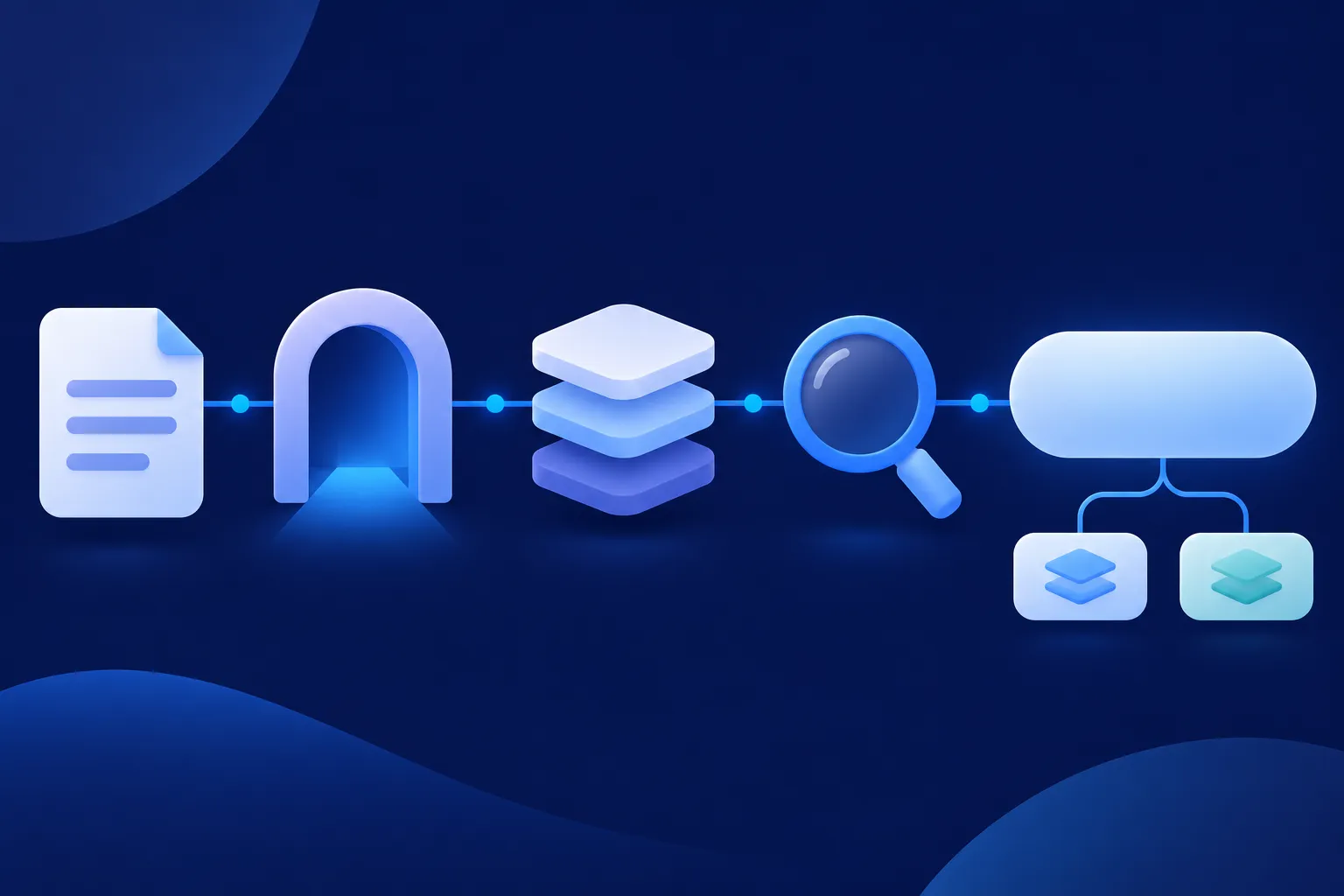
How a page travels from crawl to answer
A simplified path runs like this: a system finds a URL, crawls the page, renders it when needed, extracts the visible content and any structured data, indexes the page, retrieves relevant pages for a question, and then generates an answer or a search result. Providers differ in the details, and each documents its own pipeline.
For Google, the how Search works guide names three main stages. Crawling downloads text, images and videos, indexing analyzes the page and stores information about it, and serving returns relevant information for a query. Google also renders JavaScript pages. According to its JavaScript SEO basics, a page that returns HTTP 200 can be queued for rendering in a headless Chromium environment, and the rendered HTML is then used for indexing.
Structured data belongs to the interpretation stage. It is a machine-readable description of the page, and JSON-LD is the JSON-based format for linked data defined by the W3C JSON-LD 1.1 recommendation. It can say that a page is an article, an organization, a product or an event, and it can express relationships such as author, publisher and breadcrumb position.
Markup does not replace crawl access, a working server, visible content, index eligibility, relevance or quality signals. Each of those stays your responsibility, whichever consumer reads the page.
Add markup one entity at a time
Once the page is reachable and readable, add schema for the main thing the page is about. Three types cover most small sites. Organization belongs on the home or about page, BlogPosting or Article belongs on a post whose headline, author, image and dates appear on the page, and BreadcrumbList belongs on pages that show a visible breadcrumb trail.
Before pasting anything, look at what your theme, SEO plugin or app already outputs. Search the page source for application/ld+json. If a block for the same entity exists, update that block instead of adding a second description of the same item, because two conflicting descriptions are harder to maintain and easier to get wrong.
JSON-LD is a block of JSON inside a script tag that describes the page without changing what visitors see. An @id is a stable label for an entity, so that a post can point to the organization that published it without repeating every detail. And sameAs links an entity to other pages that identify the same entity, such as an official profile.

Article markup for a post
Google says no Article properties are required, and it lists the applicable ones as recommended (see its Article structured data page, 2026). The useful ones are headline, image, datePublished, dateModified and author, with publisher, description and mainEntityOfPage as optional context.
The example below uses a fictional tutoring site on example.com. Replace every value with facts that appear on your real page, including the dates, the image address and the organization details. Do not publish Example Tutoring or example.com on a live site.
<script type="application/ld+json">
{
  "@context": "https://schema.org",
  "@type": "BlogPosting",
  "@id": "https://example.com/blog/fractions-study-plan/#article",
  "url": "https://example.com/blog/fractions-study-plan/",
  "mainEntityOfPage": {
    "@type": "WebPage",
    "@id": "https://example.com/blog/fractions-study-plan/"
  },
  "headline": "A Four-Week Study Plan for Fractions",
  "description": "Example Tutoring explains a weekly plan for practicing fractions at home.",
  "image": [
    "https://example.com/images/fractions-study-plan-1200x675.jpg"
  ],
  "datePublished": "2026-05-04T09:00:00-05:00",
  "dateModified": "2026-05-18T10:30:00-05:00",
  "author": {
    "@type": "Organization",
    "@id": "https://example.com/#organization",
    "name": "Example Tutoring",
    "url": "https://example.com/"
  },
  "publisher": {
    "@type": "Organization",
    "@id": "https://example.com/#organization",
    "name": "Example Tutoring",
    "url": "https://example.com/",
    "logo": {
      "@type": "ImageObject",
      "url": "https://example.com/images/example-tutoring-logo.png"
    }
  },
  "articleSection": "Study Guides",
  "inLanguage": "en-US"
}
</script>
Only keep dateModified if the page was truly updated, and make sure the author shown on the page matches the author value. If your post is written by a named person, change the author to a Person with that person's real name.
Organization and breadcrumb markup
Google's Organization structured data page (2026) says no properties are required, so include the ones that apply. The example uses the same @id as the article above, which lets the two blocks refer to one organization. Use sameAs only for pages that genuinely identify the same organization, and not for social or directory pages that merely mention a similar name.
<script type="application/ld+json">
{
  "@context": "https://schema.org",
  "@type": "Organization",
  "@id": "https://example.com/#organization",
  "name": "Example Tutoring",
  "url": "https://example.com/",
  "logo": {
    "@type": "ImageObject",
    "url": "https://example.com/images/example-tutoring-logo.png"
  },
  "description": "Example Tutoring publishes practical study guides for parents and students.",
  "sameAs": [
    "https://www.example.org/profiles/example-tutoring/"
  ],
  "email": "hello@example.com"
}
</script>
Google's Breadcrumb structured data page (2026) requires itemListElement with at least two ListItem objects, each with position and name. The item address is recommended for linked trail steps. The visible trail on the page should match the markup and represent a normal path through your site.
<script type="application/ld+json">
{
  "@context": "https://schema.org",
  "@type": "BreadcrumbList",
  "@id": "https://example.com/blog/fractions-study-plan/#breadcrumb",
  "itemListElement": [
    {
      "@type": "ListItem",
      "position": 1,
      "name": "Blog",
      "item": "https://example.com/blog/"
    },
    {
      "@type": "ListItem",
      "position": 2,
      "name": "Study Guides",
      "item": "https://example.com/blog/study-guides/"
    },
    {
      "@type": "ListItem",
      "position": 3,
      "name": "A Four-Week Study Plan for Fractions",
      "item": "https://example.com/blog/fractions-study-plan/"
    }
  ]
}
</script>
To build a block for your own page, the Schema Nova generators and tools take the page details and produce JSON-LD you can review. The guide on how to add schema markup covers the placement options in more detail.
Platform notes before you paste anything
Most platforms already output some structured data, so confirm what your page emits first. Squarespace's help center says it generates structured data automatically for blog posts, events, local business, organization, product and website. Wix describes preset markups, custom markup and ways to manage duplicate markup in its help pages on preset markups and troubleshooting structured data.
Webflow's help article on adding schema markup (updated January 27, 2026) covers a schema field, custom code, a caution about duplicate markup and validation, and it warns that valid schema does not guarantee rich results.
On Next.js, the JSON-LD guide (last updated February 27, 2026) describes rendering JSON-LD in layout.js or page.js and sanitizing serialized values. HubSpot's developer blog (May 31, 2022) shows a template approach that uses require_head, and it is vendor guidance from an older post, so compare it with your current template.
For WordPress, the guide to schema markup in WordPress walks through checking existing theme and plugin output. On Shopify, check your theme's documentation and the page source before adding any block, because a duplicate is easier to prevent than to clean up.
Test the markup in four steps
Run the tests in a fixed order, because each one answers a different question. The Schema Nova tools answer the first two layers, and Google's tools answer the last two.
- View the rendered source and confirm the JSON-LD block is present and the visible content matches it.
- Paste the code into the Schema Nova schema validator to check JSON syntax and Schema.org validity, or point the Schema Nova schema checker at a live URL. The generic Schema Markup Validator also checks vocabulary validity.
- Run Google's Rich Results Test to see whether the page is eligible for a Google feature.
- After publishing, inspect the live URL with URL Inspection in Google Search Console, then allow time for crawling and reprocessing.
Passing a test means the code can be parsed and may be eligible for a feature. It does not mean the page is indexed, displayed, ranked or cited. After launch, treat AI visibility as something to observe. Watch indexed pages and search performance, and use the citation data that a platform exposes, such as the grounding and citation reporting Bing documents in its AI Performance pages.
What schema can and cannot do
Schema can clarify what a page is and who published it, support documented search features such as Google rich results, and express relationships between entities. Those are real benefits, and they are the reason to keep markup accurate across all consumers. They are separate from any promise about AI answers.
Two studies are worth knowing about, with their limits. A February 2026 preprint by Kurt Fischman, Does Schema Markup Predict AI Citation?, analyzed 730 AI citations from ChatGPT (GPT-4o with web browsing) and Gemini 1.5 Pro with search grounding, across 75 commercial queries and 1,006 unique pages. Its initial pooled analysis reported a negative association between schema presence and citation probability. The paper is not peer-reviewed, it describes an association rather than a cause, and it does not cover Google AI Overviews, Bing Copilot or Perplexity.
An April 26, 2026 paper by Kai Zhang and Jingang Yao, From Citation Selection to Citation Absorption, measured citations across ChatGPT, Google AI Overview and Gemini, and Perplexity, using 602 prompts. It found that citation breadth and citation influence are different outcomes, and that high-influence pages tended to be longer, more structured, semantically aligned and richer in extractable evidence. It measured page qualities such as length and structure, not schema markup.
Neither study shows that adding schema raises AI citations, and neither shows that AI systems ignore it. The sensible reading is that clear, complete, well-organized pages matter, and that markup is a supporting description of those pages.
FAQ markup deserves a specific note. FAQPage remains a valid schema.org type, but Google stopped showing FAQ rich results in May 2026 and removed its FAQ documentation in June 2026. Use FAQ markup only for a visible FAQ that helps your readers, and do not add it to chase a rich result. Google retired HowTo rich results earlier, as announced on the Google Search Central Blog on August 8, 2023, so HowTo markup is not a route to a Google rich result either.
For the first markup to add, read schema markup for AI search. For the wider answer engine topics, read schema for AEO and GEO.
Questions people ask
Does Google require schema markup for AI Overviews?
Google's AI features documentation (2026) says there are no additional technical requirements and no special schema.org markup for AI Overviews or AI Mode. The page still has to be indexed and eligible for a normal snippet, and any markup should match the visible text.
Does ChatGPT Search read JSON-LD?
OpenAI's help page tells publishers to allow OAI-SearchBot and to let its published IP addresses through hosting or CDN rules. Because that instruction is about crawler access, keep key facts in visible text and keep any JSON-LD accurate.
Does Perplexity use schema markup?
Perplexity's Pro Search page describes crawling, multiple searches, synthesis and source links. Make the important facts on each page visible and easy to verify, and keep markup accurate for the systems that document it.
Should I add FAQ schema for AI search?
Add FAQPage markup only when the page has a visible FAQ that helps readers. Google stopped showing FAQ rich results in May 2026, so the markup is not a route to a Google display, though it stays a valid schema.org type.
Does schema markup improve rankings?
Schema can clarify content and support eligibility for documented features, such as Google rich results. Bing and Webflow both warn that valid markup does not guarantee a rich result, so treat rankings, citations and traffic as outcomes to observe rather than promises.